This guide is written by the DeltaLLM team. It explains our product's approach and gives you a small evaluation you can repeat. It is not an independent performance benchmark.
What to compare in a LiteLLM alternative
A gateway migration is more than changing a URL. Your application needs a working model target, while your operators need the same access restrictions, budgets, and failure handling they depend on today.
| Decision | LiteLLM | DeltaLLM |
|---|---|---|
| Application API | OpenAI-compatible gateway | OpenAI-compatible gateway |
| Hosting | Self-hosted proxy; evaluate your chosen edition | Self-hosted gateway and Admin UI |
| Access and spend | Virtual keys, team controls, budgets, and rate limits | Scoped keys, organization/team/user controls, budgets, and rate limits |
| Customer plans | Evaluate how your configuration represents each customer plan | Versioned service tiers assign model access, limits, and pricing to organizations |
| Routing | Evaluate supported strategies with your workloads | Route groups expose deployments through a shared model target |
| Migration | Keep your current configuration as the rollback path | Recreate deployments and policies; issue new DeltaLLM keys |
LiteLLM's gateway overview and virtual-key documentation describe its capabilities. Check the edition and version you intend to deploy.
Where DeltaLLM's workflow differs
Define a customer plan once
Suppose Starter customers can use lower-cost models, while Growth customers can also use premium models and higher limits. Define each plan as a service tier and assign it to organizations. Prepare and review a new tier version before activating a plan change. Team and key restrictions can narrow the organization's entitlement.
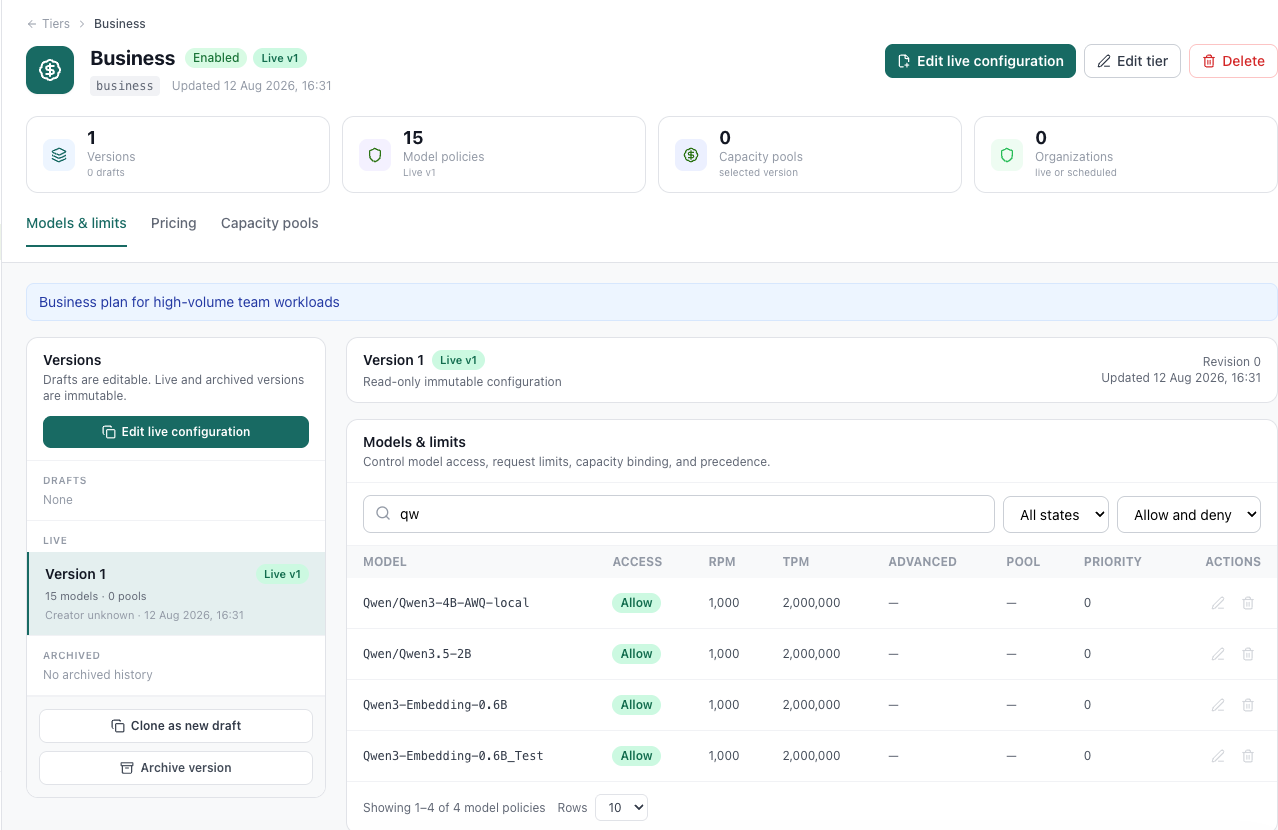
The service tiers walkthrough covers this setup. This is a reason to evaluate DeltaLLM's workflow, rather than assuming LiteLLM cannot enforce budgets or model access.
Keep one app-facing model target
Put deployments in a route group and choose how requests are distributed. Your application calls the group's model target while the gateway manages member selection. Test provider limits and failures with the strategy you actually plan to use.
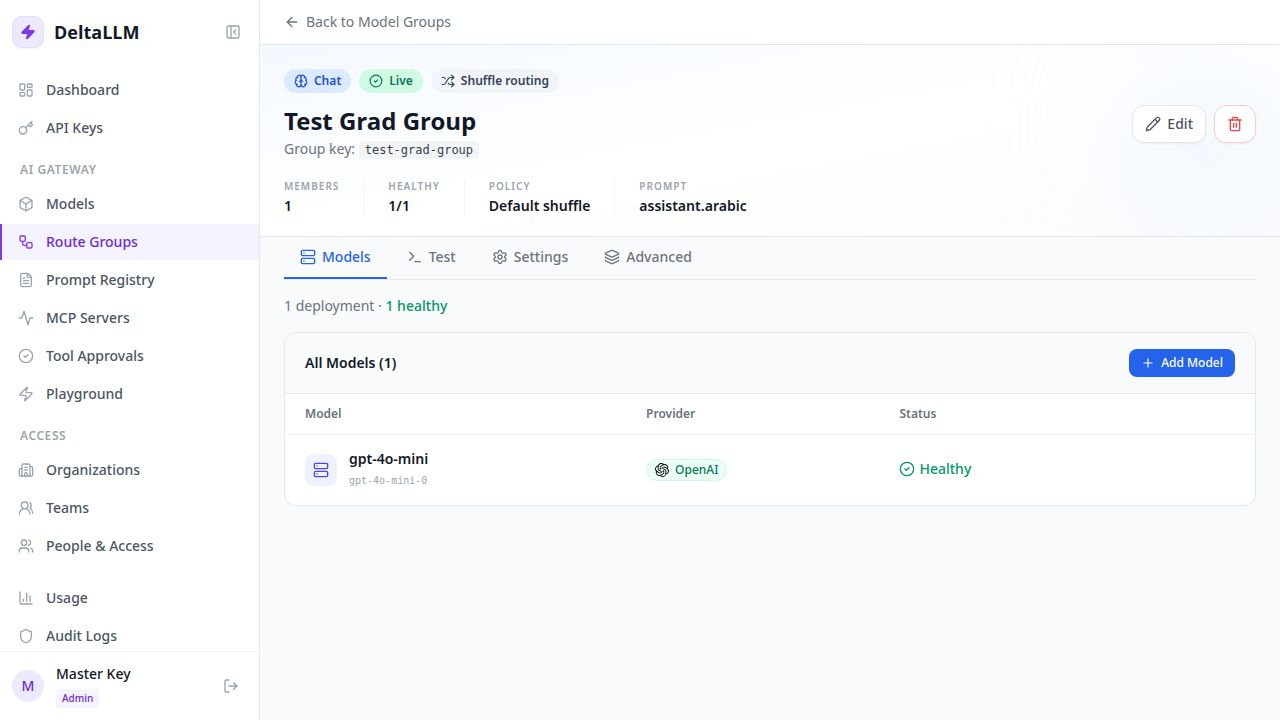
See the route groups guide for configuration and tradeoffs.
Try a migration with one unchanged chat request
Start a separate DeltaLLM evaluation using the Docker setup. The single-instance Compose address is http://localhost:4002. Add your provider credential and a deployment named gpt-4o-mini, then create a scoped application key with access to that target.
Install the Python OpenAI client with python -m pip install openai. Save this as chat-smoke.py:
import os
from openai import OpenAI

client = OpenAI(
    base_url=os.environ["LLM_BASE_URL"],
    api_key=os.environ["LLM_API_KEY"],
)
response = client.chat.completions.create(
    model="gpt-4o-mini",
    messages=[{"role": "user", "content": "Reply with one sentence about API gateways."}],
)
print(response.choices[0].message.content)
Run the same file against your existing LiteLLM gateway, then change the environment to DeltaLLM. Set each gateway's own scoped key in LLM_API_KEY; a LiteLLM virtual key is not automatically valid in DeltaLLM.
# Existing LiteLLM evaluation; substitute your configured address.
export LLM_BASE_URL=http://localhost:4000/v1
# Set LLM_API_KEY to your LiteLLM virtual key, then:
python chat-smoke.py

# DeltaLLM single-instance Compose evaluation.
export LLM_BASE_URL=http://localhost:4002/v1
# Set LLM_API_KEY to your new DeltaLLM virtual key, then:
python chat-smoke.py
The request body stays the same only when both gateways expose the same target and support its parameters. Check streaming, tools, structured outputs, timeouts, and errors separately if your application uses them.
Check access and rollback before switching traffic
- Recreate policies: inventory model aliases, provider credentials, budgets, rate limits, and team ownership. This guide does not import a LiteLLM database or its hashed keys.
- Test an allowed and a denied request: confirm a restricted key can use its permitted target and cannot reach a model outside its scope.
- Check operations: inspect the request in Usage and verify team attribution. Try a deployment failure in the evaluation environment if you depend on failover.
- Keep a rollback: move one application's traffic first. Preserve its previous URL and credential configuration until the new route has passed your checks.
Compare response correctness, errors, latency, and billed usage with the same input set and model settings. A different model, cache hit, or retry pattern can make a speed or cost comparison misleading.
When keeping LiteLLM may be the better choice
If your current gateway meets your needs and your team knows how to operate it, migration has a real cost. DeltaLLM is a newer project, and self-hosting requires database, storage, monitoring, and upgrade work. Provider-specific integrations and application parameters need checking against your deployed version.
Self-hosting controls where the gateway and its records run. Requests still reach external providers when you choose external models; it does not make those models local.