One of the most common questions from teams running DeltaLLM for multiple customers is: how do I give different organizations access to different models, with different rate limits and pricing, without configuring every single organization by hand?
Tiers are the answer. A tier is a reusable model package — define it once, assign it to as many organizations as you like, and every organization on that tier gets the same model access, limits, and pricing automatically.
What a Tier Defines
A tier answers four questions for every organization assigned to it:
- Which models can this organization use?
- What RPM and TPM limits apply per model?
- What customer price is charged for those models?
- Which shared capacity pool protects scarce model capacity?
Instead of opening each organization and editing model grants one by one, you create the tier once and assign it. Updating the tier's active version cascades to every assigned organization instantly.
The Simple Mental Model
Think of a tier as a customer plan:
| Tier | Models | Limits | Pricing | Best for |
|---|---|---|---|---|
| Starter | Low-cost models only | Low RPM and TPM | Standard pricing | Trials and small customers |
| Growth | Low-cost + selected premium models | Medium RPM and TPM | Discounted or custom pricing | Paying teams |
| Enterprise | Approved premium models | High RPM and TPM | Contract pricing | Large customers |
Create these three tiers and you can onboard any new customer in seconds — pick their plan, assign the tier, done.
Step 1: Define Your Tier
Open the Tiers catalog in the admin UI and create a new tier. Give it a name, add the models you want to include, set per-model RPM and TPM limits, and configure pricing. The tier starts as a draft — you can keep editing until you're ready.
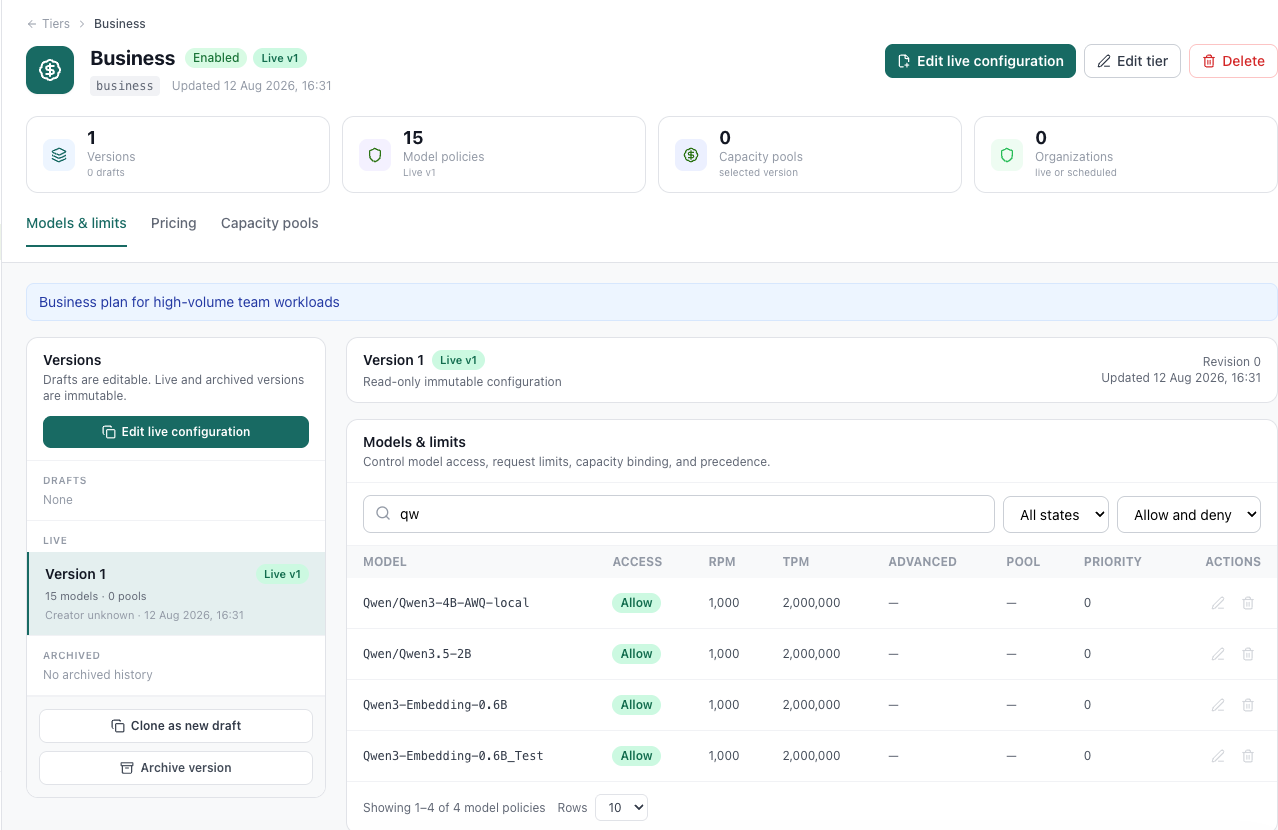
When you're satisfied, activate the draft. From that moment, the tier is live and ready to be assigned.
Step 2: Assign the Tier to an Organization
Open any organization and assign the tier as its primary service tier. DeltaLLM creates the assignment in a single database transaction — the organization, the assignment, and the cache-invalidation record are all written atomically, so there's no window where the organization exists without a valid tier.
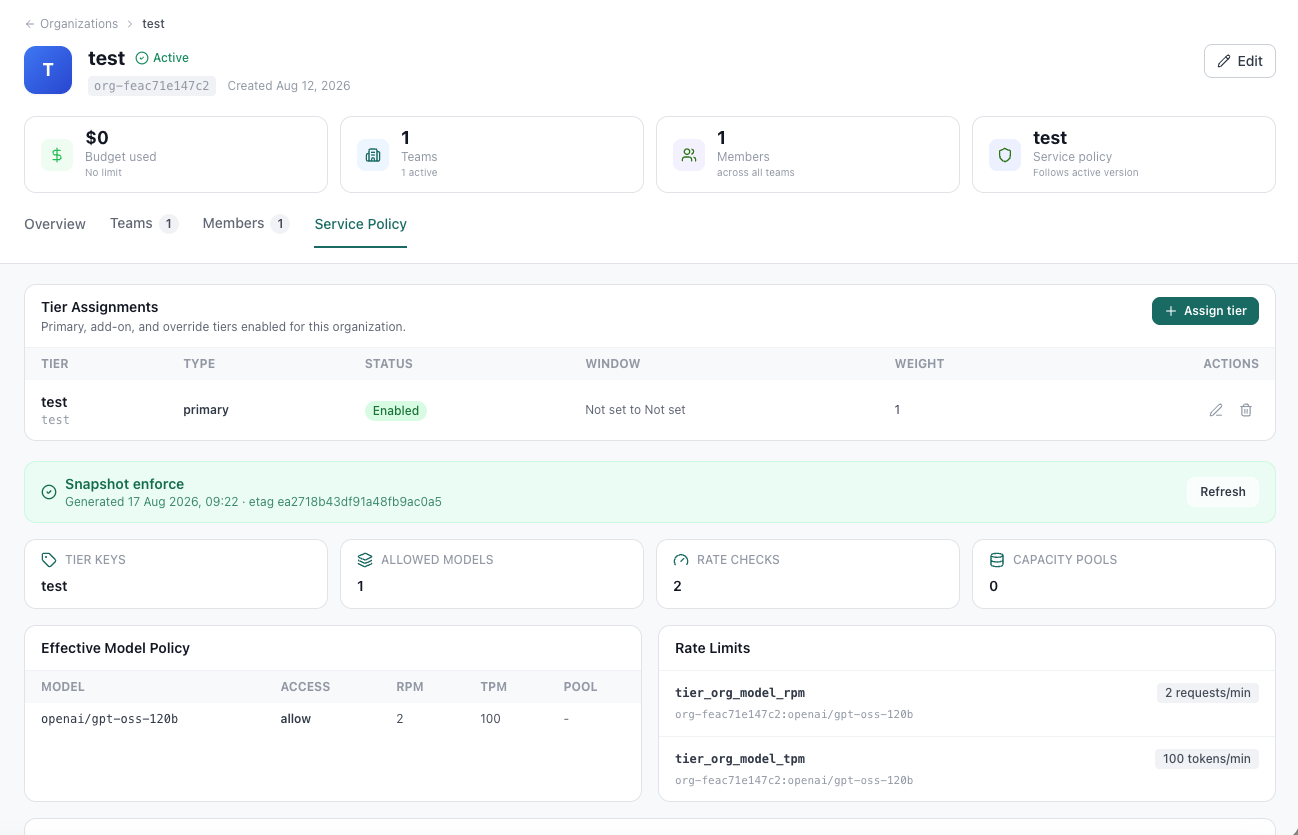
enforce mode, a primary tier is required when creating an organization. In shadow mode, the tier is staged but legacy Asset Access remains authoritative — perfect for a gradual rollout.Versioning Without Surprises
Tiers use a draft-and-activate workflow so you never accidentally push a half-finished change to live traffic:
- Draft — editable, not serving traffic. Create one by cloning the active version.
- Live — the active version all assigned organizations use.
- Live + Draft — you have an active version serving traffic and a separate draft being prepared. Normal for any change in progress.
When you activate a draft, DeltaLLM shows a change preview and the number of organizations that will be affected. The activation only goes through if both the draft revision and the active-version pointer still match the preview — protecting against race conditions when two admins are working simultaneously.
How Tiers Interact with Asset Access
Tiers and Asset Access answer different questions and work together:
| Control | Main question | Typical use |
|---|---|---|
| Tier assignment | What model package is this organization on? | Plans such as starter, growth, or enterprise |
| Asset Access | Which runtime scope can use which callable target? | Route groups, team/key/user restrictions |
For platform-managed models, the tier defines the ceiling — which models the organization can reach and at what limits. Asset Access within the organization (teams, API keys, route groups) can narrow that package further, but never expand it beyond what the tier allows.
- If the organization has no active tier assignment, normal Asset Access controls model visibility.
- If the organization has an active tier, the tier's allowed platform-managed models become authoritative. Legacy per-model grants for those models are ignored.
- Team and key Asset Access can still restrict the tier package — they just can't expand it.
Custom Tiers for Special Customers
Sometimes one customer needs different model access, limits, or pricing than anyone else on the standard plans. The right approach is to create a custom tier (or clone an existing one) rather than using organization-level fields to re-implement the same policy.
In enforce mode, DeltaLLM actively prevents this kind of drift — the API rejects new organization-level per-model limit maps and organization Asset Access writes while an active tier is assigned. The tier is the single source of truth.
Why This Matters for Multi-Tenant Deployments
Before tiers, scaling to many organizations meant either accepting configuration drift (every org slightly different) or writing external automation to keep things in sync. Now:
- One change updates everyone — activate a new tier version and all assigned organizations instantly get the updated model access and limits.
- Onboarding is instant — create an organization, pick a tier, done. No manual model grants.
- Pricing is consistent — the tier enforces the right customer price, so billing reports are accurate without manual audits.
- History is preserved — every tier version is archived. You can always see what a customer was on at any point in time.
Getting Started
Tiers are available in the DeltaLLM admin UI under the Tiers section. Start by creating your standard plans — Starter, Growth, Enterprise — then assign them when creating or editing organizations. You can migrate existing organizations by assigning a tier and using shadow mode to validate the policy before switching to enforce.
Full documentation is available at deltallm.readthedocs.io/en/latest/admin-ui/tiers/.